Charming Sushi Personalities: How the Cute Sushi Mascot Vector Pack 03 Adds a Dash of Whimsy to Everyday Projects
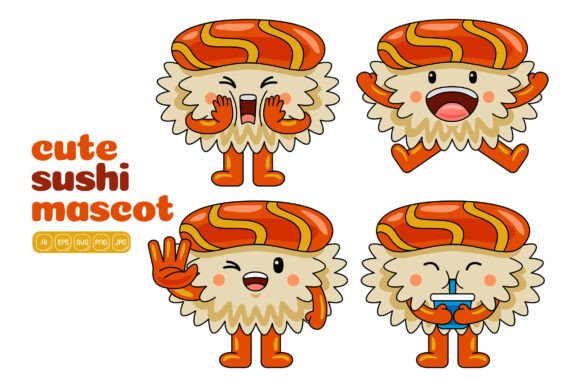
Sometimes a project needs an ingredient that photographs and standard shapes just can’t deliver. It needs a touch of personality, a wink of fun, or a dollop of warmth that makes someone pause while scrolling, flipping through a menu, or glancing at a classroom poster. The Cute Sushi Mascot Vector Pack 03 fills that gap with a hundred distinct flat-style sushi characters, each one ready to become a conversation starter in your design work. Instead of generic seafood icons, you get wasabi with a smile, cheerful tamago blocks, bashful onigiri, and little sashimi slices that practically wave hello.
This isn’t just a clip art folder. It’s a versatile illustration toolkit built for real-world flexibility. All 100 vector illustrations come with the ability to be resized infinitely and have every shape recolored independently. You can pull apart elements, mix eyes from a smiling roll with the rosy cheeks of a shy shrimp, or combine a soy sauce bottle character with a tea cup mascot to tell a mini story. The pack arrives in multiple file formats — AI, EPS, SVG, PDF, JPG, and PNG with transparent backgrounds — each rendered at a crisp 3000 x 3000 pixels. It’s the kind of resource that saves hours of drawing time while still letting you feel like you’ve created something custom.
What Actually Comes Inside This Sushi Mascot Collection
When you unzip the download, the first thing many users notice is the sheer variety. You’re not getting five poses repeated twenty times. The collection spans nigiri pieces with expressive faces, maki rolls that become little teams, tempura characters with crunchy golden outlines, and condiments that look like they just narrated a funny scene. Each illustration follows a consistent flat design style, meaning they layer beautifully over colored backgrounds, in presentation decks, or within app interfaces without clashing.
Because the source files are true vectors, you can open the AI or EPS file in Adobe Illustrator — or the SVG in a free alternative like Inkscape — and edit every curve. That nudge of a fin, the blush intensity, the line weight of the smile: everything responds. For those who prefer pixel-based edits, the high-res PNGs with transparency slot right into Photoshop, Canva, or online banner makers with zero background removal needed.
The list of included formats makes cross-software compatibility nearly painless:
- AI – native Adobe Illustrator file for full editability
- EPS – universal vector format for older or diverse applications
- SVG – web-friendly vector, perfect for modern sites and scalable interfaces
- PDF – easily viewable and often used for quick placement in documents
- JPG – high-resolution flattened image for straightforward sharing
- PNG – transparent background raster, ideal for collages and overlays
What often surprises people is that the pack isn’t frozen in place. You can change the pink of a salmon piece to match your brand palette in seconds. You can remove the face entirely if you need a simple food icon for a diagram. That adaptability shifts the pack from being a “cute add-on” to a genuine production asset.
Where These Little Sushi Icons Solve Actual Design Problems
Many pieces of stock art sit unused because they only fit one scenario. With mascot-style vectors that can be recolored, combined, and scaled, the question quickly becomes: where wouldn’t they be useful? Let’s walk through some grounded examples where people regularly put these illustrations to work.
Livening Up Social Media Calendars and Stories
A small food blogger wants to announce a new ramen recipe but needs a visual hook for Instagram Stories. A standalone food photo is nice, but a tiny animated sticker-like sushi character saying “new recipe” in a speech bubble doubles the engagement. Using the PNG files with transparent backgrounds, the blogger can layer a happy cucumber roll next to the text, set it to wiggle with a simple motion preset, and publish. The vector pack’s consistent style means she can do this all week — Monday with a tamago face, Wednesday with a soy sauce bottle, Friday with a smiling tuna — and the page looks cohesively branded, not like a random sticker assault.
Restaurant social media managers face a similar rhythm. They need daily specials, holiday closings, or event announcements. Slapping text on an image of the dining room gets old. A cute shrimp tempura character holding a “closed Thanksgiving” sign or a group of rolls celebrating International Sushi Day builds a friendly brand voice without needing an illustrator on retainer. Because the vectors scale, the same graphic works for a tiny Community post on YouTube and a full-width Facebook cover.
Print Materials That People Actually Keep
Consider a neighborhood sushi bar that hands out loyalty cards. Most look forgettable: logo, punch dots, forgetfulness by tomorrow. Adding a small, charming mascot — maybe a smiling ikura battleship roll in the corner — gives the card personality. Customers remember the character; they might even collect different designs. The pack’s ability to be recolored means the restaurant can print a batch with green themes for matcha season or warm tones in autumn without redrawing anything. Since the output is 3000 x 3000 pixels, a 3.5-inch card prints cleanly at over 850 DPI, leaving room for cropping or enlarging specific details.
Educators and workshop hosts printing worksheets or recipe cards face a similar scenario. A nutrition teacher designing a printable activity about balanced eating can scatter these friendly sushi characters around the page. They soften the learning material, making it feel more like a game and less like a test. Kids especially respond to faces on food; it invites conversations about ingredients without feeling like a lecture. Because the vector files remain editable, the teacher can translate the ingredient labels into any language and adjust the mascots’ expressions to match the tone — think wide-eyed wonder for discovery sections, contented smiles for recap pages.
Digital Products, Landing Pages, and App Micro-Interactions
When a food delivery app wants to illustrate an empty cart state, a sad onigiri sitting alone can convey a lot more than a generic illustration of a box. The Cute Sushi Mascot Vector Pack 03 slots into these UI moments surprisingly well because the flat style corresponds with current design trends that prioritize clarity and emotional tone. A developer or product designer can grab the SVG version, tweak the stroke color to match the app’s accent palette, and embed it directly in the interface. Animation possibilities open up too: a tiny smiling ebi piece could bounce when a reward is earned, all thanks to the lightweight vector path data.
Creators selling digital planners, Notion templates, or printable stickers find a similarly tangible need. The transparent PNGs serve as immediate sticker sheets; the vector file lets them create coordinating page elements. Someone could design an entire “sushi mood tracker” where each day gets a different mascot face. Because the pack includes 100 illustrations, there’s enough variety to assign moods, track habits, or even build a card game. Reselling the vectors as standalone clip art is typically a licensing question, but the pack’s description encourages creating your own illustrations by combining elements — a clear signal that remix is part of the intended workflow.
How Different People Apply the Same Pack in Completely Different Ways
It’s easy to assume these vectors are only for food-related brands, but that narrow view misses whole categories of use. Here’s a look at how varied users bring the sushi mascots into their world.
Freelancers and small agency designers often need to produce quick mood boards, pitch materials, or event collateral. They might not have time to illustrate a set of characters from scratch for a local festival’s “sushi and sake night.” The pack becomes a jumpstart: pick five mascots, unify their color palette with the event’s theme, and place them around a flyer layout in 20 minutes. The editable nature means they can remove details that don’t fit the client’s vibe while keeping the core cuteness.
Bloggers and content creators who write about cooking, parenting, or travel find the pack helps break up long text posts. A post about introducing new foods to picky eaters suddenly feels more inviting when nestled between a curious salmon roll and a nervous edamame bean. The humor lowers the reader’s defenses. Using the JPG versions ensures fast loading without large file sizes, while the transparent PNGs let the images float over colored quote cards.
Small business owners running delis, bento delivery services, or Japanese snack subscription boxes use the mascots in packaging inserts. A handwritten thank-you note accompanied by a printed sticker of a blushing tuna roll personalizes an order without hiring a calligrapher. Because the files are so high-resolution, a small 1-inch print still shows crisp outlines and clear expressions. The flat colors reproduce well on kraft paper or glossy stickers, keeping production simple.
Teachers and community organizers tap the pack for bulletin boards, classroom reward charts, and fundraiser materials. A school international food fair needs signage that appeals to all ages. Hand-drawn sushi might look amateur; complex photography might feel sterile. These flat-design mascots bridge the gap — friendly enough for kids, clean enough for adults. When the fair theme changes next year from sushi to global snacks, the same user could bring in the pack’s condiment characters to advertise a ramen station, saving design time.
Real-World Scenarios Where Timing and Context Matter
Knowing when to use a playful illustration is as important as knowing how. These mascots tend to shine in upbeat, casual, or educational settings. A law firm’s annual report probably isn’t the place for a smiling maki roll. But for a startup’s team lunch invite, a dentist’s “try new foods after treatment” handout, or a library’s summer reading program with a food theme, the mood fits. People often mention that the pack works best when the project calls for a human touch without needing an actual human face.
Another underrated moment: when you need to localize content. Because each element is individually editable, you can adapt the illustrations to languages that read right-to-left, swap out a subtle cultural reference, or add a local ingredient while keeping the same core mascot. An English “hello” on a sushi roll becomes a French “bonjour” with no art degradation. This makes the pack useful for global brands, travel agencies, and multilingual educators who often waste hours searching for culturally adaptable clip art.
What to Keep in Mind Before Applying the Mascots
While the pack offers remarkable flexibility, a few practical considerations help avoid frustration. First, editing vectors requires some familiarity with software like Adobe Illustrator or a free SVG editor. Recoloring a single shape is beginner-level; rearranging facial features might take a few tutorials if you’ve never worked with grouped paths. Fortunately, the flat design style means there aren’t complex gradients to wrangle, so the learning curve stays manageable.
Second, consistent use across a brand or product benefits from a style guide. Even with 100 illustrations, you’ll want to decide which characters represent which message, which shade of orange you apply to the salmon, and which line thickness matches your existing visuals. Spending 30 minutes creating a mini palette and saving it into your library keeps Thursday’s social graphic from looking wildly different from Monday’s. The pack makes it possible; a little upfront organization makes it effortless.
Third, check the licensing terms if you plan to use the images on merchandise for resale. Many vector packs allow personal and commercial use with limitations on templates or competitive products. Reading the fine print before printing 500 t-shirts prevents a headache. The pack is sold as a design resource, so using it in flattened banner designs, website hero images, or printed marketing collateral is usually fine, but turning the raw vectors into a new clip art storefront might not be.
Finally, think about the emotional message. These mascots are inherently cheerful. If your content discusses a serious topic like food safety violations or a somber cultural history, you might pause before placing a winking wasabi in the corner. Tone mismatch can undermine credibility. Yet for the vast majority of everyday communications — celebrating a restaurant anniversary, teaching kids about nutrition, promoting a cooking class, or just adding joy to a menu — the tone lands exactly right.
Creating Your Own Illustrations by Combining Elements
One of the most underutilized features in a vector pack like this is the freedom to disassemble and reassemble. You might take the headband from a determined sushi chef character and place it on a slice of tamago to introduce a “new dish” alert. Or you might create a conversation scene by grouping three different sushi mascots together, adding quote bubbles that you draw yourself, and exporting the result as a fresh illustration. This hybrid approach means you’re not simply placing stock art; you’re building derivative work that feels entirely yours while still benefiting from the professional base art.
The Cute Sushi Mascot Vector Pack 03 encourages such play. Because the files separate shapes logically, selecting and moving an eye or a utensil rarely requires advanced masking. Many designers describe this as a “mix and match” feeling akin to paper dolls but with infinite combinations. For a freelance illustrator, this could become the starting point for a personalized character sheet for a client. For a hobbyist building a Twitch channel, it’s a fast path to emotes and scene overlays that no other streamer has.
In an era where visual communication moves faster than ever, having a hundred ready-to-personalize sushi mascots might seem niche at first glance. But once you begin placing them into everyday templates, activity sheets, app screens, and printed signs, their utility expands well beyond cuisine. They become tiny brand ambassadors, conversation starters, and memory hooks — all built from editable, scalable vector art that respects your creative flow.