House Cleaning Equipment Vector: Versatile, Ready‑to‑Use Design Files
Finding the right visuals for a cleaning service brochure, an instructional infographic, or a hygiene app can eat up hours of design time. House cleaning equipment vector illustrations fill this gap by offering a coherent set of tools, appliances, and everyday items—already built with clean lines and consistent styling. When you work with a well‑structured AI EPS collection, you are not just buying pictures; you gain a flexible foundation that speeds up concept development and keeps your message clear across different media.
What Makes This AI EPS Illustration Set Immediately Useful
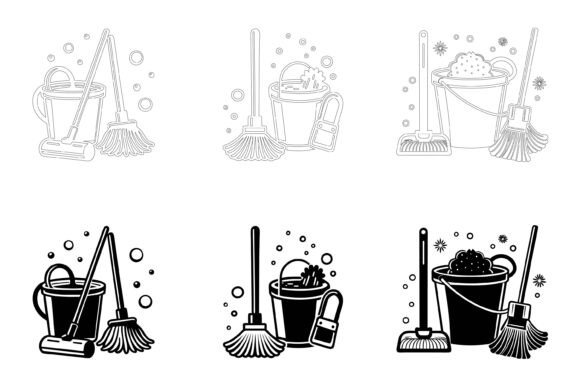
This particular collection focuses on house cleaning equipment: mops, buckets, spray bottles, vacuums, brooms, gloves, sponges, and related symbols. Because the files are provided in fully editable AI and EPS formats, you can open them in Illustrator or comparable vector apps and start working without needing to trace or reconstruct anything. The inclusion of a JPG preview means you can quickly scan the contents before committing to software. Support for both Mac and Windows environments removes platform friction, so whether you are a freelancer on a MacBook or part of a marketing team on Windows workstations, the assets behave reliably.
The real advantage comes from how the set is organized. A neat file and layer structure might sound like a minor detail, but when you are on a tight deadline, you appreciate being able to locate the exact mop icon, isolate it, and drop it into a layout without hunting through dozens of unlabeled paths. Consistency in line weight, corner style, and detail level ensures that when you mix and match elements, they look like they belong together. That cohesion is particularly valuable for creating infographics, app interfaces, or printed checklists where visual harmony influences perceived professionalism.
Editing Freedom That Adapts to Your Brand
One of the most practical aspects of these vectors is how easily you can customize them. Not every cleaning service uses blue and green. Perhaps your brand identity relies on warm coral and charcoal. With native AI and EPS files, you can recolor each object, adjust stroke thickness, and even break apart grouped elements to use a single sponge or a standalone vacuum motor. This level of control means you do not have to compromise your visual language. You are not locked into someone else’s color palette. The assets become a raw material, ready to absorb your brand’s personality.
Similarly, if you need a simplified version for a tiny app icon, you can remove details that would become muddy at small sizes. If you are preparing a large‑format poster for a trade show, you can scale up a spray bottle illustration without losing crispness. The vector nature guarantees resolution independence, which makes the set suitable for both a 16‑pixel favicon and a 24‑inch wide printed sign. This scalability is especially important when you maintain a consistent visual thread across web, social media, and physical materials.
Where House Cleaning Equipment Vectors Solve Real Design Problems
Consider a small business owner who runs a residential cleaning company. They need a price list, a vehicle magnet, and a series of Instagram posts. Hiring a custom illustrator for every single graphic is expensive and slow. Instead, this collection provides a ready‑made visual vocabulary. A single purchase can feed multiple projects: the bucket and mop for the price list heading, the vacuum for a “deep clean” service highlight, the spray bottle for a disinfecting tip carousel. The outcome is a consistent look without the back‑and‑forth of commissioning bespoke icons.
Educators creating hygiene‑themed materials for schools or community health programs also benefit. A well‑crafted infographic about proper cleaning routines becomes more engaging when accompanied by simple, recognizable icons. By using these vectors, an educator can quickly assemble a poster that shows the sequence of sweeping, mopping, and disinfecting in a way that is easy for children and adults to follow. The editable nature of the files means text labels can be placed directly over or beside the icons without awkward spacing issues.
App and software developers building a home management or smart cleaning planner interface can integrate these symbols as UI elements. Because the collection is tailored for symbols and apps, the icons tend to have clear silhouettes and readable shapes even at reduced sizes. A notification bell, a task‑complete checkmark, and a broom icon can sit side by side in a navigation bar without clashing, provided you tweak colors to match your app’s theme. The ability to modify the icons easily means you can create filled and outlined variants from the same base file, expanding your interface’s icon set without extra cost.
Marketers and content creators who produce cleaning product reviews or “how‑to” guides will find that pairing text with a visual set reduces cognitive load for the audience. Instead of describing a grout brush, you can show it. Instead of listing steps in a video thumbnail, you can place a numbered sequence of cleaning tools. The vector format allows you to break the equipment down into component parts, so you might highlight only the handle of a dustpan to illustrate a grip‑improvement tip. This flexibility gives editorial content a polished, magazine‑ready feel without requiring original photography for every article.
How Organization and Detail Consistency Improve Your Workflow
Digging deeper into the file structure, a neatly organized layer panel does more than save clicks. It allows you to turn visibility on and off for different tool categories, export subsets of illustrations for specific campaigns, and quickly share selected assets with collaborators. If you are working with a junior designer or a client who needs to pick a few icons, you can point them to a clearly labeled layer group instead of explaining complex selections. This clear communication shortens feedback loops and reduces the chance of misaligned version files.
Perfection in details is not an empty claim; in practice, it means the knot on a trash bag, the bristles on a brush, and the water droplets on a spray nozzle are drawn with thoughtful consistency. That kind of meticulousness prevents awkward mismatches when you combine icons from different parts of the set. For instance, a feather duster next to a squeegee will share the same visual weight and styling, so one does not unintentionally look bulkier or out of place. This uniformity is vital for multi‑page documents, dashboards, and packaging where every graphic must reinforce the same quality signal.
Who Stands to Gain the Most
The audience is surprisingly broad. Freelance graphic designers can build a library of niche icons that are otherwise hard to find in generic stock packs. Small business owners in the cleaning industry, janitorial services, and home organization coaching can elevate their brand image without a full‑time design team. Bloggers and publishers who regularly cover home care topics can maintain a signature illustration style across posts. Public health communicators can produce clear, respectful materials that avoid childish clip‑art aesthetics. Even hobbyists creating a printable chore chart for their family might find the modest investment pays off in a more pleasant and functional design.
However, it is worth considering fit. If your project calls for hyper‑realistic 3D renderings or hand‑drawn watercolor effects, this vector set probably will not match. The aesthetic here leans toward clean, functional line art and flat‑design shapes that prioritize clarity over texture. That is a strength for technical diagrams, UI, and corporate brochures, but not for every creative direction. The download includes only AI, EPS, and JPG files, so anyone who works exclusively in raster‑based software like Procreate would need to import and potentially trace, which adds a step. Checking your workflow compatibility before purchase makes sense.
Making the Most of the JPG Previews and Cross‑Platform Support
The JPG included in the package might seem like an afterthought, but it serves a helpful purpose. Before installing or opening a large vector file, you can browse the preview to see every icon at a glance. This is particularly useful on a tablet or a low‑resource computer where firing up Illustrator just to scan assets is cumbersome. You can also share the JPG with clients for approval, marking up the image to indicate which icons you intend to use, all before spending time on final layouts.
Cross‑platform compatibility matters more now that remote teams mix devices. A marketing manager on Windows can open the EPS in CorelDRAW or a freelancer on a Mac can import the AI into Affinity Designer. While some conversion quirks may appear depending on the software version, the emphasis on clean structuring minimizes problems. Having a consistent starting file reduces the need for tech‑support tangents and lets everyone focus on the creative work.
Where These Vectors Fit into Print, Web, and Beyond
Print projects benefit from the ability to output vectors at any dpi. A cleaning service flyer printed on glossy cardstock will retain sharp edges, even after the printer scales the artwork. Infographics inserted into a magazine article or a community newsletter can be repurposed later for the web edition, simply by exporting the same artboard at screen resolution. Symbols for apps and software dashboards can be exported as SVGs or PNGs, and because you own the source vector files, you can generate exactly the size variants you need for iOS, Android, or desktop platforms. This multi‑channel readiness is a key reason why design teams often prefer owning editable vector sets over subscribing to icon fonts that limit customization.
Practical Ways to Approach Color Changes and Modifications
When you first open the AI or EPS file, you might see a palette designed for a generic cleaning brand. Changing it is straightforward: select an object or a group, bring up the color panel, and apply your own brand hues. You can also use the “Recolor Artwork” feature in Illustrator to experiment with different color schemes across the entire set at once. This experimentation helps you quickly see whether teal and mustard feel friendlier than navy and silver for a residential cleaning service. Keeping a backup of the original file ensures you can always return to the default state if a client changes their mind later.
Beyond color, you might want to combine elements to create a new icon. For example, you could take the bucket and overlay a “prohibited” slash to indicate “no mopping.” Because layers are organized logically, you can duplicate, reposition, and union shapes without digging through a mess. This extendability extends the value of the set well beyond what you initially see in the preview.
Understanding When to Pause and Compare Options
While this illustration set delivers a strong coherence, there are scenarios where you might need additional file formats. If your workflow requires SVG files right out of the zip, you will need to export them yourself from the AI or EPS source, which is a minor extra step but doable. If you work primarily in Canva and prefer to drag‑and‑drop, you might need to convert the vectors to SVG or high‑resolution PNG first. The download does not include a pre‑built icon font, so for web developers who favor icon fonts, this might be a limitation—though exporting SVGs and using them inline offers even more control over multi‑color icons.
Another consideration is whether the style aligns with serious or delicate topics. The illustrations lean approachable and clear, which works well for most consumer‑facing contexts. But a legal document about biohazard cleaning might require more clinical, minimal icons that these might not perfectly satisfy. In such cases, browsing the preview closely helps decide if adjustments can bridge the gap or if a different set is more appropriate.
Bringing the Assets into Your Own Projects
Once you have the files, you can immediately slot them into brochures, digital ads, employee training manuals, social media graphics, smartphone apps, explainer videos, and even product packaging. The underlying thread is that you regain creative time. Instead of hunting fragmented free resources and patching together mismatched icons, you start with a unified kit and adapt it to your voice. This savings in time often outweighs the upfront cost, especially for recurring design needs.
If you are a marketing consultant building a visual identity for a cleaning franchise, you can treat these illustrations as a baseline. From that baseline, you create a style guide that specifies the exact hues and usage, then hand it off to other designers or the client themselves. Because the origin files are editable, the franchise can later add new illustrations drawn in a matching style, using the existing set as a template. This scalability makes the collection more than a one‑time asset; it becomes part of an evolving design system.
For teams and independent creators alike, the true value lies in combining the well‑organized AI EPS structure with the freedom to tweak every detail. When you need a house cleaning equipment vector that instantly communicates a sparkling window or a deep‑clean shower, you can find it, adapt it, and deploy it without delay. That reliability lets you spend your energy on the message and the storytelling, not on troubleshooting graphics. The collection stands as a practical tool—one that quietly supports campaigns, products, and ideas where cleanliness and clarity go hand in hand.