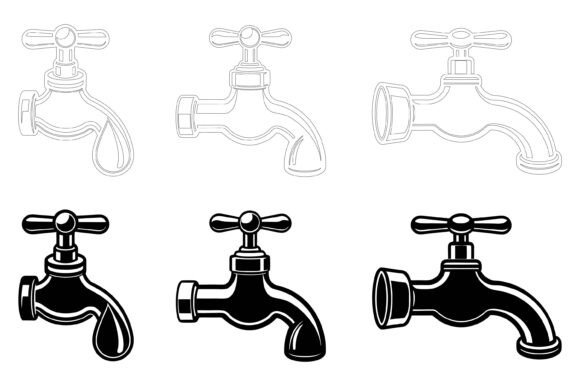
Tap Icon Illustration Set
When searching for design assets, the right icon can tie a project together or leave it feeling incomplete. The Tap Icon illustration set is a collection built around a single, recognizable symbol—the water tap or faucet—delivered in industry-standard vector formats. It is marketed to designers, developers, and content creators who need a polished, editable graphic for use across digital and print media. Understanding what this set offers, where it performs well, and where it may fall short can help you decide whether it deserves a place in your toolkit.
What the Tap Icon Collection Includes
At its core, the Tap Icon set is a vector-based illustration package. The files are provided in AI (Adobe Illustrator) and EPS (Encapsulated PostScript) formats, with an accompanying JPG preview or raster version. This combination covers both editable source files and a ready-to-use bitmap alternative. The package is designed to work on both Mac and Windows systems, which broadens its accessibility across different operating environments.
Beyond the file types, the collection emphasizes internal organization. The layers and file structure are described as neatly arranged, which can reduce the time you spend hunting for specific elements. For anyone who has opened a poorly labeled vector file, the value of clean layer naming and logical grouping becomes immediately clear. The attention to detail extends to consistency across the icon variations, meaning you are less likely to encounter misaligned anchor points or uneven stroke weights—issues that can plague less carefully constructed assets.
Who Stands to Benefit Most from This Illustration Set
The Tap Icon set is not a sprawling icon library. It centres on a single concept, which makes it particularly useful for certain roles and projects. UI and UX designers working on applications related to water, plumbing, utilities, or smart home devices may find a focused, high-quality tap icon directly relevant. Print designers creating brochures, manuals, or signage for businesses in the home improvement, sustainability, or hospitality sectors could also use the illustration as a central or supporting visual element.
Infographic creators and presentation designers represent another audience segment. A tap icon can symbolize concepts like flow, access, conservation, or resource management. When you need to communicate these ideas visually, having a vector illustration that you can recolor and scale without loss of quality is a practical advantage. App developers and web designers building interfaces that involve water usage tracking, irrigation controls, or similar functionality may also integrate the icon into buttons, dashboards, or onboarding screens.
Key Strengths of the Tap Icon Design
Several characteristics contribute to the set's practical appeal. The editability is a primary strength. Because the files are vector-based, you can change colors, adjust shapes, and modify details to align with your brand palette or stylistic preferences. This flexibility means the icon can adapt to different visual languages rather than forcing you to work around a fixed colour scheme or line weight.
Consistency and attention to detail are additional points in the set's favour. A well-constructed icon maintains uniform stroke widths, smooth curves, and balanced proportions. When these qualities are present, the icon looks professional at any size—from a small app symbol to a large printed banner. The organized layer structure also supports efficient workflows, particularly when you need to isolate specific parts of the illustration or animate individual elements.
The multi-format delivery addresses different stages of a project. The AI file is ideal for deep editing in Illustrator. The EPS format offers broader compatibility with other vector editing software, including older versions and some open-source alternatives. The JPG provides a quick preview or a lightweight option for drafts and mockups where full editability is unnecessary.
Practical Considerations and Tradeoffs
No design asset is without limitations, and recognizing them upfront can prevent frustration later. The most significant consideration is scope. This is not a comprehensive icon pack covering dozens of categories. It focuses on the tap concept. If you need a full set of related plumbing, utility, or household icons, you may need to source additional assets separately. The Tap Icon set can serve as a centrepiece or a complement, but expecting it to cover all your icon needs would be a mismatch.
Another factor involves software requirements. While the EPS format broadens compatibility, fully leveraging the organized layers and detailed editability generally requires access to Adobe Illustrator or a similarly capable vector editor. Users relying on more basic tools may find they cannot access all the structural benefits the set offers. The JPG is there as a fallback, but it sacrifices scalability and layer-based editing.
Learning curve is also worth noting. If you are comfortable navigating vector files and adjusting paths, you will likely find the editing process straightforward. However, someone new to vector graphics might need time to learn how to modify colours, resize elements, and work with layers effectively. The set's organized structure helps, but it does not eliminate the foundational skills required for vector editing.
When the Tap Icon Set Is a Strong Fit
Certain project types align especially well with what this collection provides. Print materials—such as flyers, posters, product catalogues, and instruction sheets—benefit from the high-resolution scalability of vector artwork. A tap icon printed at large dimensions remains crisp, with no pixelation to undermine the professional appearance of the piece.
Web and mobile interface design is another area where the set fits naturally. Icons used in navigation, feature highlights, or interactive elements must remain sharp across varying screen densities. Vector-based icons can be exported at multiple resolutions without quality loss, making them suitable for responsive design workflows. The ability to recolor the icon also allows it to adapt to light and dark interface modes.
Branded content and marketing materials represent a further use case. When a business wants to incorporate water-related imagery into its visual identity—whether for a plumbing service, an environmental campaign, or a product that involves liquid dispensing—having an editable icon means the graphic can be customized to match the exact brand colours and stylistic treatment.
Situations Where Alternatives May Be Worth Considering
There are scenarios where a different type of asset might serve you better. If your project requires multiple icon styles—such as line, filled, flat, and three-dimensional variations all within the same theme—a single-icon set may feel limiting. Broader icon libraries or subscription-based design resources often provide stylistic variety within one package or platform.
Projects demanding extensive customization beyond basic edits might also call for a different approach. If you need to fundamentally alter the icon's structure, add complex shading, or create an entirely new composition built around the tap, starting from a custom illustration or a more flexible template could be more efficient than reworking an existing design.
Budget and licensing are practical considerations as well. If you only need a tap icon for a single, low-stakes project and do not anticipate reusing it, free icon resources or open-source alternatives might meet your needs without the associated cost. However, free assets often come with usage restrictions, lower quality, or less reliable organization, so the tradeoff involves time spent searching and verifying suitability.
Evaluating the Quality of Vector Illustrations
When assessing any vector icon set, including the Tap Icon collection, there are specific markers of quality to examine. Look for smooth anchor point placement—fewer unnecessary points typically indicate a cleaner, more editable path. Check whether stroke weights remain consistent across the design, as variations can make an icon feel unbalanced. Examine how the illustration handles corners and curves; clean transitions suggest careful construction.
Layer naming conventions also reveal the creator's attention to usability. Descriptive names like "handle," "spout," and "water drop" are far more helpful than generic labels like "Layer 1" or "Path 43." When layers are logically grouped, you can isolate and edit parts of the icon without deciphering the file structure first. These details separate a thoughtfully produced asset from one assembled with less care.
Making an Informed Decision
Deciding whether the Tap Icon illustration set aligns with your needs comes down to a few clarifying questions. First, identify the specific role the icon will play in your project. Is it a primary visual element, a supporting graphic, or one of many icons in a larger system? The more central it is, the more the quality and editability matter. Second, consider your comfort level with vector editing software. If you are proficient, the set's customization potential becomes a meaningful advantage. If you prefer to use assets as-is with minimal adjustments, confirm that the default colours and style work for your context.
Third, think about your broader asset needs. Purchasing a single, well-crafted icon may be the right move if it fills a specific gap. If you anticipate needing numerous related icons in the near future, exploring larger bundles or subscription services might be more economical and stylistically cohesive.
Final Thoughts
The Tap Icon illustration set offers a focused, editable, and well-organized resource for designers and developers working with water-related or utility-themed visuals. Its strengths lie in vector quality, cross-platform compatibility, and the flexibility to adapt the icon to different visual contexts. The main limitations involve its narrow scope and the expectation of basic vector editing proficiency. By weighing the set's characteristics against your project requirements, technical skills, and budget, you can determine whether it represents a practical addition to your design resources or whether alternative solutions better match your workflow and creative goals.