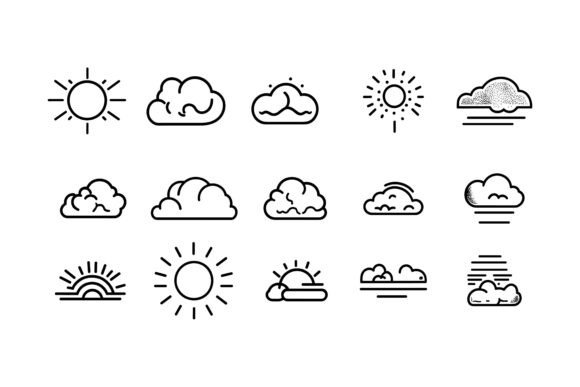
Weather Icon Set: Professional AI, EPS & JPG Icons
When you're designing a weather app, building a travel blog, or putting together a school science project, small visual details carry a lot of weight. Weather icons aren't just decorative flourishes—they communicate forecast information instantly and add a layer of polish that separates amateur work from professional output. The right Weather Icon Set becomes a reliable tool that saves you drawing time and keeps every screen, page, or slide visually cohesive.
This particular collection bundles crisp vector illustrations into three practical formats: Adobe Illustrator (AI), EPS, and high-quality JPG. Whether you are working on a Mac or Windows machine, you can open the files without compatibility headaches. But what really makes the set stand out is the careful thought put into organization, editability, and consistent styling. Let's walk through what you actually get and how that helps you work smarter.
What Sets This Weather Icon Set Apart
A quick glance at the file structure tells you plenty about the attention to detail behind the scenes. Instead of dumping dozens of unnamed vectors into a single folder, the designer has grouped icons logically and labeled every layer inside the source files. This foresight alone can shave minutes off each task—minutes that compound into hours saved during a busy month of client work or content creation.
- Flexible file formats: AI and EPS give you fully scalable vectors that won't pixelate, no matter how large you make them. JPGs serve as ready-to-use assets for presentations, social media, or documents.
- Cross-platform compatibility: The package opens smoothly on macOS and Windows. You won't need to convert files or beg a colleague to open them on their machine.
- Neatly organized structure: Layers are named clearly within the AI files, so you can isolate a single rain cloud or moon icon without hunting through dozens of unnamed shapes.
- Perfection in details: Every icon shares the same stroke weight, corner rounding, and color ramps. Place a sun next to a thunderstorm, and they feel like they belong to the same visual family.
- Easy color and shape editing: Because the vectors are built cleanly, you can recolor an entire set to match your brand palette in seconds. Adjust line thickness, swap a fill, or tweak a cloud silhouette without advanced Illustrator skills.
These features transform a simple icon pack into a flexible design asset that adapts to your specific needs. The consistency alone eliminates the jarring mismatch that often happens when you mix icons from different free repositories. Instead, your project communicates a quiet professionalism that viewers and users notice, even if they can't quite put their finger on why.
Practical Applications Across Industries and Projects
The value of a well-made Weather Icon Set extends far beyond meteorology websites. Because weather is a universal topic, these icons find their way into countless personal, professional, educational, and commercial projects. Here are a few real-world scenarios where they make a measurable difference.
Web and Mobile App Design
Developers working on travel planners, event calendars, or outdoor activity apps often need to display forecast data in a glanceable format. A cohesive icon family keeps the interface clean and intuitive. Instead of writing custom code to render scalable weather symbols, you can drop in the EPS vectors or export them as SVGs for responsive screens. Because the icons are meticulously detailed, they remain crisp at tiny favicon sizes and still look stunning when scaled up for tablet dashboards.
Print and Editorial Projects
Magazine layouts, community newsletters, and tourism brochures use weather visuals to set the mood before a reader even starts the text. The JPG files slip easily into Word, InDesign, or Canva templates, so a volunteer assembling a town festival guide can place a cheerful sun icon next to the Saturday forecast without needing design software expertise. For commercial print, the vector formats guarantee output-ready sharpness, whether the graphic appears on a poster or a business card.
Infographics and Data Visualization
A climate change infographic becomes much more accessible when rainfall data is paired with a recognizable raindrop icon, and temperature trends are marked with sunny and snowy symbols. The uniform style across the Weather Icon Set ensures that the icons support the data rather than distract from it. Marketers and researchers alike can quickly create presentations that feel cohesive, even when pulling charts from multiple sources.
Educational Materials and Presentations
Teachers preparing science worksheets about the water cycle, seasons, or weather patterns can use these icons to illustrate concepts without spending time drawing by hand or scouring the web for assets that match each other. Students can incorporate them into digital projects, learning early on how consistent visual language improves communication. The editable AI files also let educators customize icons—perhaps adding a thermometer to the sun graphic for a lesson on temperature scales.
Digital Marketing and Social Media
Brands often tie promotions to the weather. A coffee shop might run a “rainy day discount” post featuring a soft rain cloud icon, while a travel agency highlights sunny skies in its holiday deals. Using the same icon style across email, Instagram stories, and blog banners reinforces brand recall. The JPG format gives social media managers a quick asset they can drop into Canva, while the vector files give graphic designers the control to animate the icons for video snippets—a small touch that can boost engagement.
How a Thoughtfully Designed Icon Set Improves Your Workflow
Speed is one obvious advantage. Rather than sketching concepts or adjusting mismatched freebies, you grab a pre-built, consistent resource and move on to the next task. But the benefits run deeper. A reusable Weather Icon Set acts as a design system in miniature: it establishes color, shape, and style rules that you can carry across multiple projects. That means future infographics, app updates, or print pieces automatically align with what you built before, reducing rework.
From a user experience perspective, consistency builds trust. If a weather widget displays sunny icons that look drastically different from the thunderstorm icons elsewhere on the same screen, users may pause, even subconsciously. A cohesive set eliminates that friction, helping people process information faster. This holds true for internal business dashboards too—when data analysts use uniform icons in reports, stakeholders can scan data points more efficiently.
Editing flexibility also fuels creativity. Perhaps you need a windy icon that leans a bit more aggressively for a storm-chasing app, or you want a moon phase set that follows a specific color gradient. Because the AI and EPS files are layered and organized, you can isolate individual elements—like a wind gust line or a cloud shape—and adapt them in a few clicks. There's no need to redraw from scratch or pay for a custom illustration.
Choosing and Using Your Weather Icon Set Wisely
Before you adopt any icon collection, think about how and where you plan to use it. Check the license terms carefully—some sets restrict use on physical merchandise, while others allow broad commercial app distribution. The collection discussed here typically includes a commercial license, but always confirm that your intended use case is covered. If you freelance and hand off files to clients, a license that permits transfers can save awkward conversations later.
File compatibility matters too. While AI and EPS are industry standards, test one EPS in your preferred software if you work in Affinity Designer, Sketch, or older versions of CorelDRAW. Most modern tools import EPS well, but a quick test avoids a surprise deadline crunch. Keep the original layered files stored in a cloud folder as your master copy, and export JPGs or PNGs for one-off tasks so you never accidentally overwrite your editable source.
Finally, consider organizing your own project-level asset library that includes this Weather Icon Set along with other consistent design elements. Tag the icons by weather type, format, and primary color so you can find exactly what you need without opening multiple files. Small habits like this multiply the time-saving value of a well-structured icon pack and make your workflow feel effortless over the long haul.
When you need weather imagery that matches the quality of the rest of your design work, a thoughtfully built set can be a small investment with outsized returns. The Weather Icon Set we’ve explored here—with its AI, EPS, and JPG files, clean organization, and easy customization—fits that description. It slides into web, print, app, and presentation projects without fuss, freeing you to focus on the bigger creative picture.