What Award Ribbon Icons Can Do for Your Projects and Why They Deserve a Spot in Your Toolkit
You have probably seen those small, polished badge-like graphics on websites, in printed flyers, or tucked into the corner of a mobile app screen. They say things like "Best Seller," "Editor's Pick," or "Top Rated" without using a single word beyond the label. That tiny piece of visual communication is often an award ribbon icon, and when you have a well-designed set at your fingertips, it quietly changes how people respond to what you create.
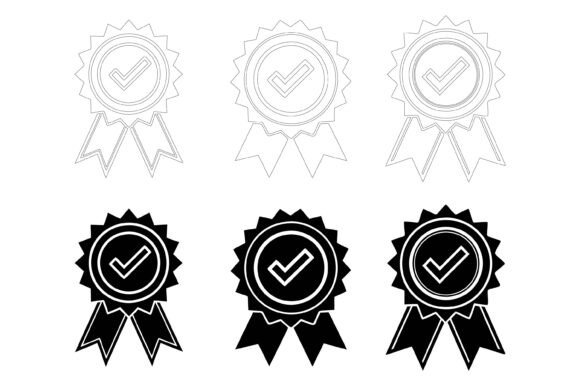
The Award Ribbon Icons collection we are talking about here is not just another zip file full of generic shapes. It is a carefully organized illustration set delivered in AI, EPS, and JPG formats, built to work on both Mac and Windows. The files come with a clean layer structure, which means you can open them and immediately start editing, recoloring, or resizing without untangling a mess of ungrouped objects. For anyone who has ever downloaded a "premium" asset only to spend forty minutes fixing sloppy vector points, that kind of neatness matters more than you might expect.
When a Simple Ribbon Icon Becomes the Right Visual Shortcut
Think about the last time you scanned a product page or a service listing. Your eyes probably landed on elements that signaled trust or quality before you read a single paragraph of body text. A small ribbon icon with a star or a checkmark does exactly that. It borrows from a visual language we all recognize, one rooted in competitions, certifications, and official seals of approval. People do not need to consciously decode it. The recognition happens instantly.
Small business owners use award ribbon icons on their websites to highlight customer favorites, warranty-backed items, or staff picks. Educators slip them into digital worksheets and presentation slides to mark bonus questions or completed milestones. Event organizers place them on name badges and certificates. The common thread is simple: you need to draw attention to something worth noticing, and you need to do it without adding clutter or explanation.
Freelancers and Independent Creators
If you design social media graphics, pitch decks, or client proposals, you already know the pressure of making things look professional without starting from scratch every time. Having a folder of editable ribbon icons changes the pace of your workflow. You can pull one in, match the color to the brand palette, adjust the text, and have a badge ready for a testimonial slide or a service highlight section within minutes. The fact that the files are compatible with Illustrator and other vector editing tools on both operating systems means one less friction point when you bounce between devices or collaborate with someone on a different platform.
A freelancer preparing a wedding invitation suite might use a delicate gold ribbon to frame the couple's names. The same freelancer, working on a restaurant menu the following week, can grab a bolder version from the set and recolor it to mark chef specials. The consistency of the illustration style across the collection prevents that awkward moment where your design looks pieced together from three different sources.
Marketers and E-Commerce Store Owners
Online shoppers make split-second decisions. Product badges are not decorative extras; they are conversion tools. An award ribbon icon positioned next to a "Free Shipping" promise or a "Limited Edition" tag gives those words weight. Without a visual marker, the text can blend into the surrounding description. With one, it becomes a micro-commitment from the brand.
Email marketers face a similar dynamic. In an inbox full of plain text and large hero images, a compact ribbon graphic inside a promotional email can highlight a discount, a deadline, or a membership perk. Because the icons in this set are built with attention to detail and consistency, they scale down cleanly for mobile screens, where a large portion of email opens now happens. Nobody wants a badge that turns into a pixelated smudge on a phone display.
Bloggers, Publishers, and Content Creators
Editorial websites often need to signal sponsored content, reader polls, or editorial reviews in a way that feels integrated rather than interruptive. A subtle ribbon icon tucked next to a headline communicates "Staff Pick" faster than a parenthetical note. For blogs that run seasonal roundups or yearly award posts, these icons become reusable building blocks. You can create a visual system where different ribbon colors correspond to different categories, and readers catch on without needing a legend.
YouTubers and streamers have also started adapting ribbon-style graphics for video thumbnails and channel art. A small "Viewer's Choice" badge in the corner of a thumbnail gives returning subscribers a reason to click. The layered file structure of this AI EPS collection makes it straightforward to export just the icon you need at the exact dimensions your platform requires.
Educators and Instructional Designers
Classroom materials and online courses thrive on clear visual cues. A ribbon icon can mark a "Key Concept" box in a PDF handout or identify a "Challenge Question" in a slide deck without adding paragraphs of instruction. Because the icons are editable, an educator teaching multiple subjects can color-code them by unit or difficulty level. The organized layer structure saves time during lesson prep, which is often done in short bursts between classes or meetings.
For teachers who create and sell resources on marketplaces like Teachers Pay Teachers, having a commercial-use-friendly illustration set is part of running a small publishing operation. Buyers of those educational products expect polished design, and a consistent set of ribbons helps build a recognizable brand across dozens of individual listings.
Practical Scenarios Where These Icons Solve a Specific Problem
Imagine you are putting together a nonprofit's annual impact report. You have statistics, stories, and photos, but the layout feels flat. Adding three small ribbon icons next to key metrics, one for meals served, one for volunteers engaged, one for funds raised, gives the eye a resting point and makes the numbers feel like achievements rather than data points. You open the AI file, change the ribbon colors to match the organization's palette, adjust the text, and export. The whole process takes less time than searching three different stock sites for something close enough.
Consider a local bakery that prints weekly specials sheets. The owner wants to mark gluten-free options and customer favorites without redesigning the entire template each week. A small set of printed stickers using the ribbon icons solves that. The JPG versions in the collection make it easy to drop the graphics into a simple Word or Canva template, so no design experience is required at the bakery level.
Think about an app developer building an onboarding flow. Gamification elements like achievement badges keep users engaged during the first few sessions. A clean, scalable ribbon icon from this set, recolored to fit the app's UI theme, can serve as the visual foundation for a "Profile Complete" or "Streak Achieved" badge. Because the files are vector-based, the developer or UI designer can export at multiple resolutions for different device densities without quality loss.
What You Should Consider Before Adding These Icons to Your Workflow
The biggest advantage of this collection, the editability and full control, also comes with a small learning curve if you are not familiar with vector editing software. You do not need to be an expert, but knowing how to open an AI or EPS file, select individual elements, and change fill colors will unlock the full value. If your workflow relies entirely on browser-based tools, you will want to confirm that those tools accept vector uploads or that you are comfortable working with the included high-resolution JPG versions as a fallback.
Think about your color environment before you start customizing. An icon set is not a finished design; it is raw material. The ribbons will look strongest when their colors relate intentionally to the palette of the project they live in. A neon green badge on a muted earth-tone website will feel jarring. Spend a few minutes sampling colors from your brand guide or existing layout before editing the icons, and the result will feel cohesive rather than tacked on.
Also consider the file organization. The description mentions a neat layer structure, which is genuinely helpful when you are working across multiple projects. Take a moment to explore how the original file is arranged before you start duplicating and modifying. A little familiarity upfront prevents the slow drift toward a cluttered artboard later, especially if you end up creating dozens of variations over time.
Why the Format and Platform Compatibility Matter
Many illustrators release resources that work beautifully on one operating system but behave strangely on another. The fact that this Award Ribbon Icons set is designed explicitly for both Mac and Windows users removes a small but persistent source of friction. If you collaborate with a remote team member who uses a different setup, you are not going to get that late-night message about missing fonts or broken paths.
The inclusion of AI, EPS, and JPG formats covers the three main use cases: deep editing in Illustrator, broad compatibility across vector programs, and quick placement in raster-based or non-design software. That range means the same purchase serves a graphic designer building a brand identity and a small business owner updating a Squarespace homepage.
How Consistency and Detail Shape the Final Impression
When a set of icons is drawn with consistent line weights, matching corner radii, and uniform spacing, your projects inherit a subtle polish that viewers may not consciously notice but would absolutely notice if it were missing. Inconsistency creates a vague sense of something being off. Consistency makes the design feel intentional and trustworthy. The "perfection in details" mentioned in the collection description is not marketing language for its own sake; it translates directly to how your finished flyer, app screen, or product label is perceived by the people you want to impress or persuade.
For infographic designers, this consistency is especially important. A multi-part infographic might use five different ribbon icons across various sections. If each one looked like it came from a different artist, the entire graphic would lose credibility. A unified set keeps the visual language stable, which is exactly what you want when you are presenting data or guiding someone through sequential information.
Making the Decision That Fits Your Actual Needs
No single resource, no matter how well-crafted, is right for every person in every situation. If your projects rarely call for badges, seals, or highlighted callouts, then a ribbon icon set is not going to transform your daily work. But if you regularly find yourself needing to mark something as special, endorsed, selected, or achieved, having a cohesive, editable collection saves you from the slow accumulation of mismatched downloads from scattered sources.
The people who get the most from this type of illustration set are the ones who treat it as a flexible ingredient rather than a rigid template. You change the colors. You adjust the typography inside the banner. You combine it with other elements you already own. Over time, it becomes part of your visual vocabulary, and you reach for it without overthinking, because you know exactly how it will behave when you open the file and get to work.
For creators, entrepreneurs, educators, and publishers who want to add that layer of recognition and emphasis without hiring an illustrator or starting from a blank canvas, a well-organized AI EPS collection like this one is a practical step forward. It does not promise to reinvent your design process, but it does remove enough friction to make your finished work look a little more considered and a little more complete.